
Perfect Acquisition With Passcode Unlock for A8/A8X Devices
February 11th, 2026 by Elcomsoft R&DCategory: «Elcomsoft News», «Mobile», «Tips & Tricks»
Perfect Acquisition is the most reliable method to acquire data from an iOS device. It is completely forensically sound – it doesn’t modify a single bit of the filesystem. When supported, this method should always be used over alternatives. This guide outlines the entire process, from acquiring the data dump to decrypting and mounting it for analysis.
Supported devices and process overview
Perfect Acquisition was previously available for a range of 32-bit Apple devices, from iPhone 3GS to iPhone 5c. Now, we also support iPhone 6, iPhone 6 Plus, iPad Mini 4, iPad Air 2, iPod Touch 6, as well as Apple TV 4 (HD) and HomePod (original model). This is the first time SEP passcode cracking has been publicly available for these devices.
All iOS versions starting with iOS 8.0 are supported. For iOS 12.1 and earlier, passcode recovery speed is 26 passcodes/sec. iOS 12.1.1 and newer are also supported, yet passcode recovery speed can be very slow (it may take minutes per passcode).
Note: only iPhone 6, iPhone 6 Plus, iPad Mini 4, iPad Air 2, and iPod Touch 6 can be protected with a passcode. Apple TV 4 (HD) and HomePod (original model) do not have a passcode, yet they can run tvOS/audioOS 26, which is also supported.
Perfect Acquisition involves the following stages:
- Booting the device, applying the SEP exploit, and imaging the disk
- Breaking the passcode (for iPhone/iPod Touch/iPad devices), acquiring the decryption keys
- Decrypting or mounting the disk image; keychain extraction
Note: This is a very brief write-up – not a full-fledged guide by any means, but rather a bare sequence of steps with corresponding commands. It intentionally simplifies many important nuances, which will be covered in a separate, more comprehensive article.
Booting the device, applying the SEP exploit, and imaging the disk
During the acquisition process, the device needs to be booted twice. The first boot extracts critical low-level information from the SEP, required for the next exploitation step. This data is automatically saved in the tool’s cache. On subsequent boots, the cached information is used to exploit SEP, which then provides full access to cryptographic keys needed to decrypt all userdata. This second-stage boot enables passcode recovery and keybag decryption, ultimately allowing a complete physical extraction. To begin, boot the device into EIFT mode with the device connected in DFU mode.
./EIFT_cmd boot -wAfter bootloader exploitation, EIFT detects the iOS version installed and prompts you to supply the correct firmware. Unlike older EIFT releases, where the firmware version had to match exactly, the new version lists multiple options:
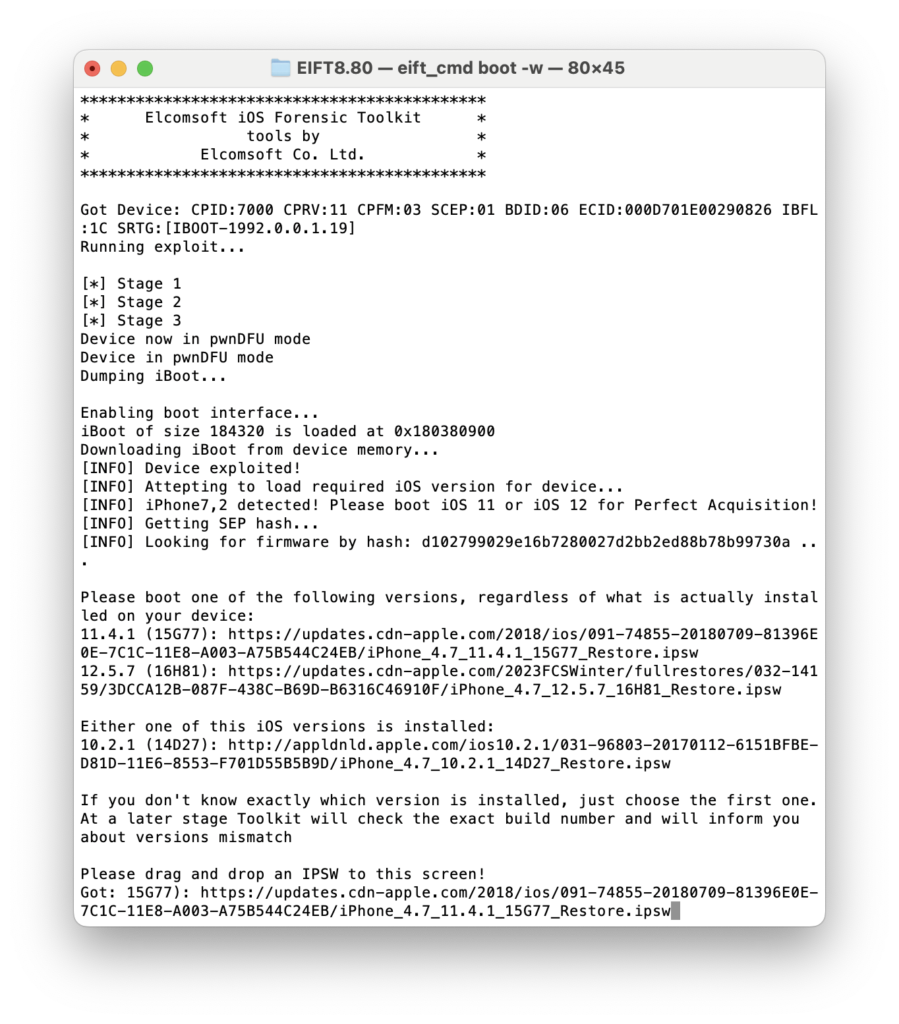
You may still choose to boot the installed version — that’s for the old-style acquisition (without passcode cracking). For Perfect Acquisition, which includes passcode cracking, select the first listed version. In this case iOS 11.4.1, regardless of the installed version (from iOS 8 to iOS 12). In rare instances where you run into problems, it may be worth trying to boot the other listed version (like for example 12.5.7 as seen here), however this should not be needed in most cases.
Then, boot Salvietta:
./EIFT_cmd ramdisk salviettabootAfter the first execution of salviettaboot, the toolkit displays the message “Done configuring SEP, please reboot the device to finish SEP exploit!” and forces the iPhone to reboot. This is expected behavior. Simply repeat the boot and salviettaboot commands – it will work on the second attempt.
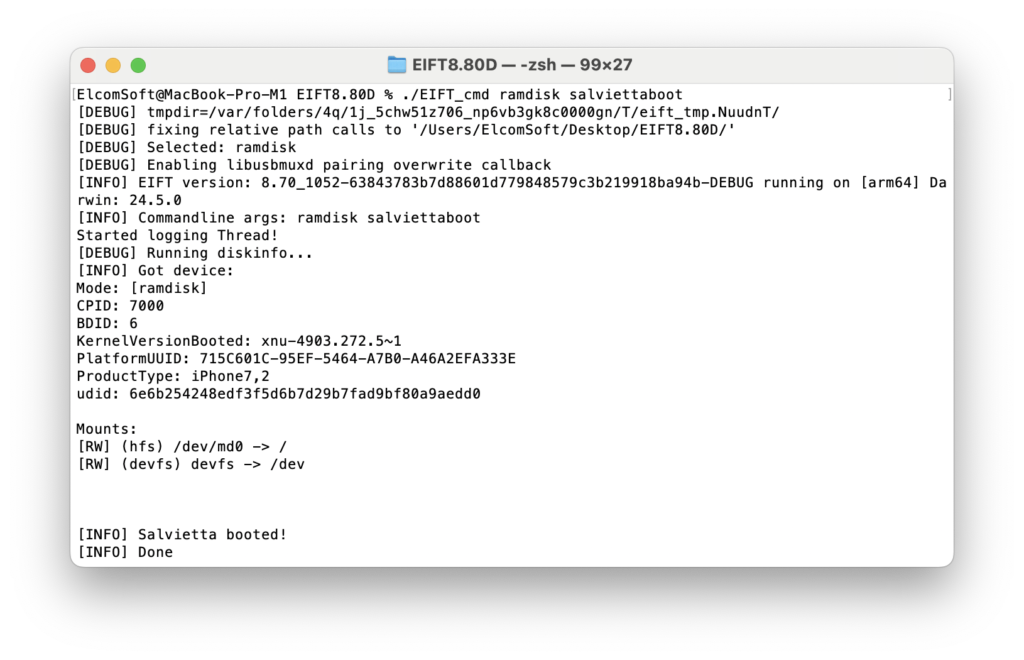
Once the device is booted and displays “Exploited” on the screen, you can image the disk (user partition for HFS, or the entire APFS container):
./EIFT_cmd ramdisk diskdump -o data.dmgNote: Make sure the file specified after the -o parameter does not exist; otherwise, the process will error out.
You may also extract the system partition when dealing with an HFS filesystem (optional and only useful if the device is jailbroken or malware is suspected):
./EIFT_cmd ramdisk diskdump --system -o system.dmg
Note: When APFS filesystem is used, the System Volume is always automatically included in the dump.
Breaking the passcode and acquiring the decryption keys
Start by extracting the BFU (Before First Unlock) keys – those not protected by the passcode. Many critical keys (including those used to decrypt user data) are stored in the System Keybag, which must be decrypted later on-device using the correct passcode (either known or recovered).
./EIFT_cmd ramdisk dumpkeys -n -o keys_bfu.plistThen, extract the system keybag.:
./EIFT_cmd fstool -i data.dmg -B systembag.kb -k keys_bfu.plistNow you can start breaking the passcode (skip if already known). Only numeric passcodes are currently supported. Passcode cracking is done inside Salvietta and runs entirely within SEP.
./EIFT_cmd ramdisk passcode -b systembag.kb -k keys_bfu.plistNote: This supports numeric passcodes (length is auto-detected if it is 4 ot 6). For other types, consult the full product manual to learn how to set additional options.
Passcode recovery speed is 26 passcodes per second, performed entirely on-device.
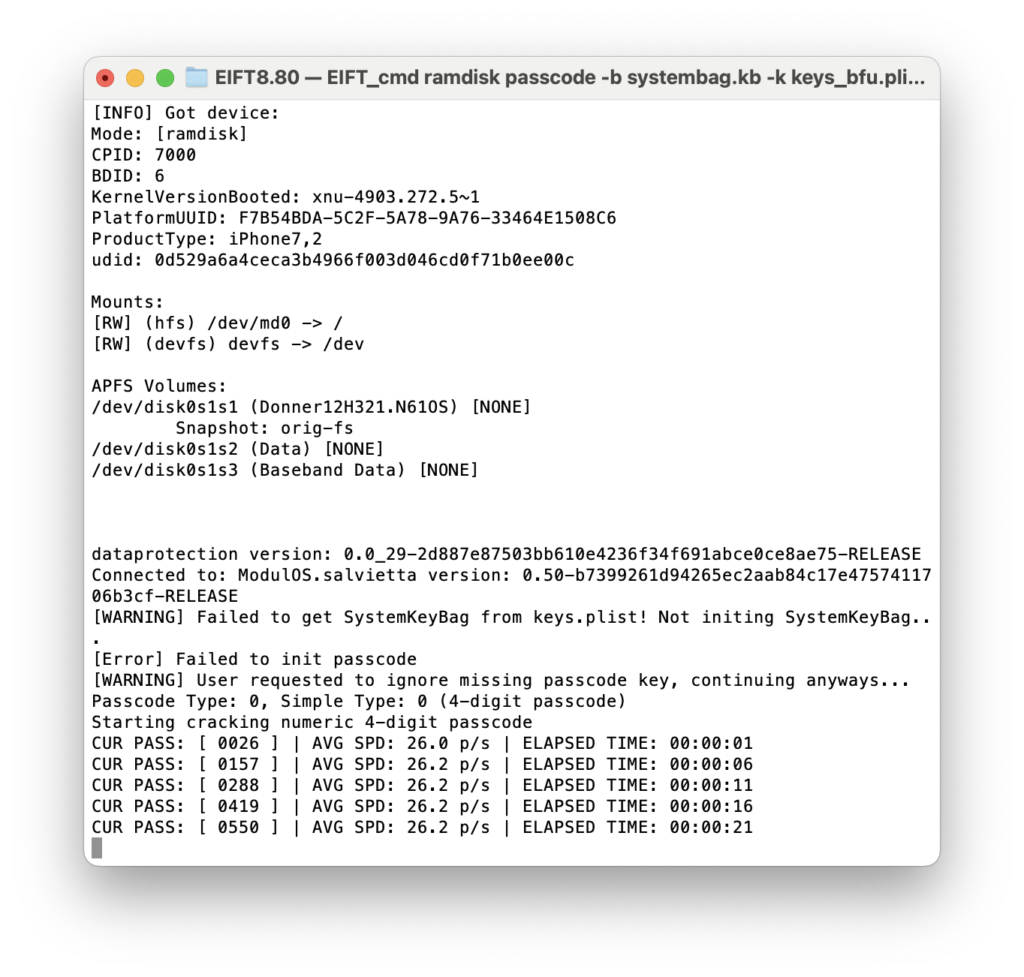
Once the passcode is recovered, extract the full set of decryption keys:
./EIFT_cmd ramdisk dumpkeys -k keys_bfu.plist -b systembag.kb -o keys.plist -p <PASSCODE>Example (for passcode 123456):
./EIFT_cmd ramdisk dumpkeys -k keys_bfu.plist -b systembag.kb -o keys.plist -p 123456If no passcode was set, simply omit the -p parameter; the full set of keys must still be dumped even if no passcode is set!
This concludes all operations requiring the physical device. You now have the complete dataset for analysis.
Decrypting or mounting the disk image and keychain extraction
The recommended method for both HFS and APFS is mounting using EIFT or our free standalone mounting tool (fstool); this gives full access to the data in a clear, structured way. EIFT is the only tool you need aside from the image and keys on macOS, Linux, or Windows. Just make sure FUSE is installed (macFUSE on macOS, FUSE on Linux, WinFsp on Windows).
./EIFT_cmd fstool -i data.dmg -k keys.plist --mountOnce mounted, you can analyze the data using any third-party forensic software. On macOS and Linux you’re limited to free tools like iLEAPP; on Windows, there is a wide range of commercial tools like Magnet AXIOM or Cellebrite Physical Analyzer, and there you can use our fstool (again, do not forget to install WinFsp first):
fstool.exe -i data.dmg -k keys.plist --mount
Finally, extract the keychain from either filesystem:
./EIFT_cmd tools keychain -i data.dmg -k keys.plist -o keychain.xmlFinal Notes
Perfect Acquisition ensures a sound, repeatable process for iOS data extraction. By preserving the device’s state and treating it as a decryption oracle, investigators can access encrypted content while maintaining forensic integrity.
Always retain original dumps, perform modifications on duplicates, and document every step to preserve the chain of custody.
More to come: In upcoming posts, we’ll explore the in-house SEP exploit powering Perfect Acquisition, and our custom-built OS – Salvietta – which runs inside SEP independently of Apple’s SEPOS. These advancements unlock advanced forensic workflows, including passcode recovery from disabled devices running iOS 12.1 or earlier.


- Elcomsoft Distributed Password Recovery goes 64-bit, adds NVIDIA Blackwell support26 March, 2026
- iOS Forensic Toolkit 9.0: full unlocking and perfect acquisition support for iPhone 6/6 Plus and other Apple A8/A8X devices11 February, 2026
- Elcomsoft Quick Triage30 December, 2025
- Introducing free forensic tools12 December, 2025
- Elcomsoft System Recovery 8.36 adds Windows Server 2025 support, BitLocker key exporting, and enhanced SRUM analysis14 November, 2025