
Looks Can Lie: Is That Really an NVMe Drive?
March 17th, 2026 by Oleg AfoninCategory: «General»
Many storage devices and adapter boards look alike. When holding a module with a connector that looks suspiciously like the M.2, how do you know exactly what you are dealing with? Is that M.2 board a SATA drive, a fast NVMe device or a Wi-Fi/Bluetooth combo? Will a drive removed from an Apple computer work in a simple mechanical adapter, or will it require the original Apple device to access? A physical connector does not guarantee the underlying technology.
While the NVMe protocol powers everything from standard consumer M.2 slots to enterprise U.2 and EDSFF devices, the hardware world is full of deceptive lookalikes. For example, the proprietary raw NAND modules found in recent Apple hardware might look like standard NVMe disks, but they are completely unreadable outside their host system because they lack an onboard controller. In this article, we will break down the physical form factors that actually host true NVMe storage and help you spot the proprietary lookalikes.
NVMe Form Factor & Protocol Support Table
Let us start with a table.
| Form Factor | Interface/Transport | Notes |
|---|---|---|
| M.2 (Standard M-Key / B-Key) | NVMe, PCIe, SATA | The universal consumer standard. M-Key is standard for PCIe/NVMe SSDs, while B-Key is often used for SATA or cellular modems. |
| M.2 (Key E / Key A+E) | PCIe/USB (typically Wi-Fi/BT; rare NVMe use) | Traditionally for Wi-Fi/Bluetooth. Natively supports PCIe, allowing niche NVMe SSDs to operate over the interface (yet this is not the intended purpose). |
| Apple Proprietary (Old: 2013–2019) | NVMe, PCIe (AHCI) | Varies by model year and connector generation. Proprietary blade connectors. Early iterations (pre-2015) utilized PCIe AHCI; later models adopted true NVMe. |
| Apple Proprietary (New: M-Series Mac Mini/Studio) | – (Raw NAND only) | Removable storage boards that do not contain storage controllers. Will typically not work outside of Apple hardware. |
| HHHL (PCI-e Add-in Card) | NVMe, PCIe | Half-Height, Half-Length form factor. Plugs directly into standard motherboard PCIe expansion slots. |
| U.2 / U.3 (SFF-8639) | NVMe, PCIe, SAS, SATA | The traditional enterprise standard. U.3 refines the connector for “tri-mode” backplanes (NVMe, SAS, SATA interchangeability). |
| EDSFF (E1, E3, etc.) | NVMe, PCIe, CXL | EDSFF SSDs are NVMe over PCIe, while the connector family is also being used for other device classes, including Compute Express Link (CXL) devices. The modern data center standard. |
| Samsung NF1 (NGSFF) | NVMe, PCIe | Early, proprietary high-density server format introduced by Samsung. Strictly utilized NVMe/PCIe for bandwidth. Considered legacy at this point. |
Technical Notes
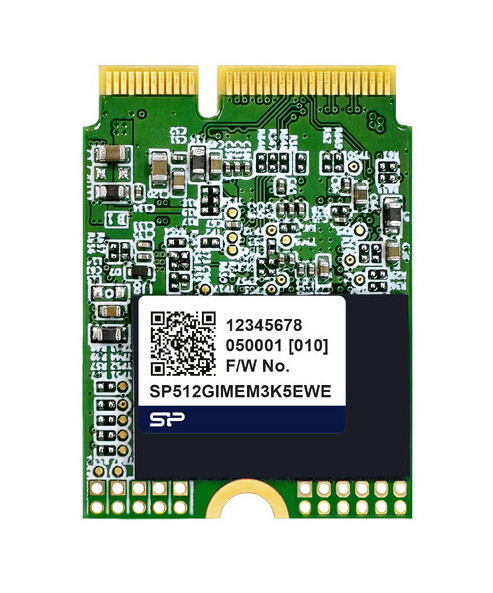
The M.2 form factor is the de facto standard for consumer drives. However, an M.2 board can host a variety of hardware and support a range of protocols, visually identifiable by the configuration of physical cutouts (the “keys”). Below is an image of a typical M.2 Key E module.
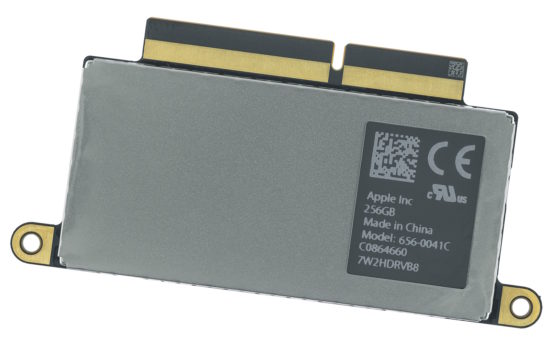
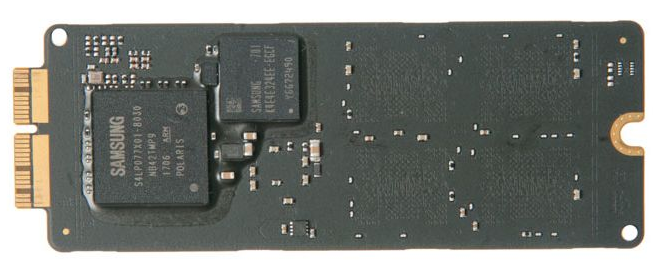
The Apple 2013-2019 connectors. Apple SSDs from the 2013-2019 period use multiple proprietary connector types, most commonly 12+16-pin and later 22+34-pin designs. However, these connectors do not map cleanly to specific product lines or years, and both types may appear across overlapping generations. Earlier 12+16-pin modules were typically PCIe AHCI-based, while later designs transitioned to NVMe; connector type alone is not sufficient to determine protocol support. The newer 22+34-pin connector is associated with later NVMe-based SSDs. Exact model-year compatibility must always be verified; refer to Apple Proprietary SSDs: Ultimate Guide to Specs & Upgrades | BeetsBlog for details. 22+34 pin (top) and 12+16 pin (bottom) modules:
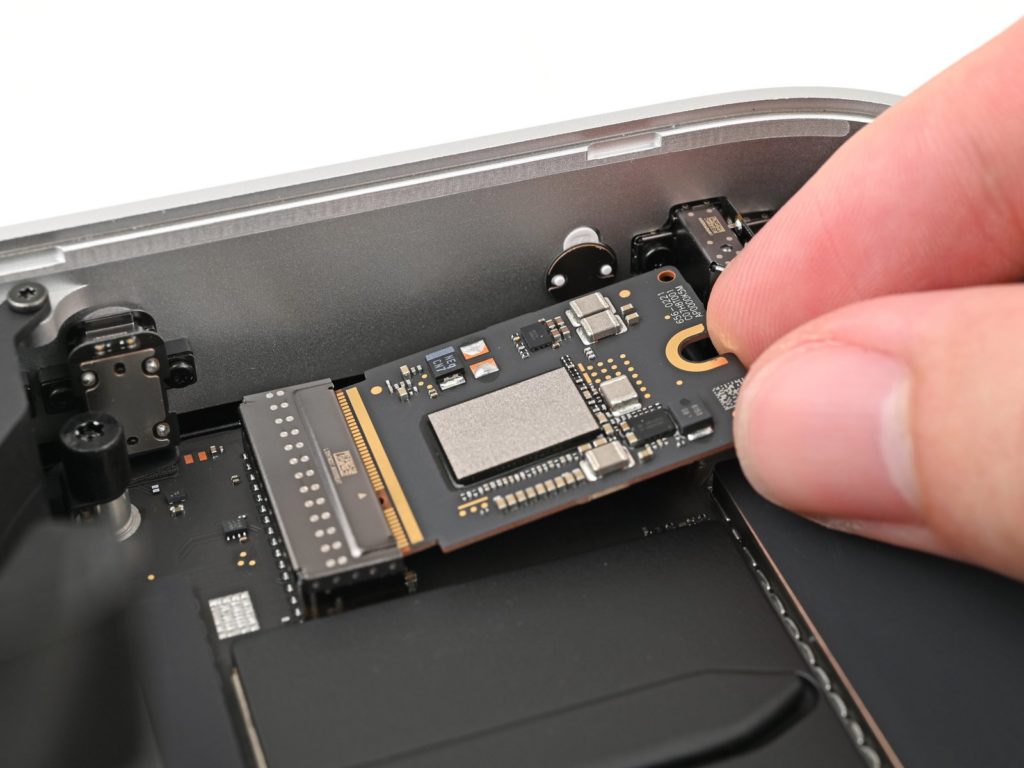
The Mac Mini “SSD”. The removable storage modules in modern Apple Silicon hardware (like the M4 Mac Mini or Mac Studio) are not NVMe drives, despite physically resembling a stubby M.2 SSD. They consist entirely of raw NAND flash chips. The actual NVMe storage controller is integrated directly into the Apple M-series SoC, meaning the physical connector only transmits raw NAND signals. As a result, these modules will not “work” outside of Apple hardware, while direct readouts will be likely fruitless due to encryption. A Mac Mini (2024) storage module (courtesy of iFixit):
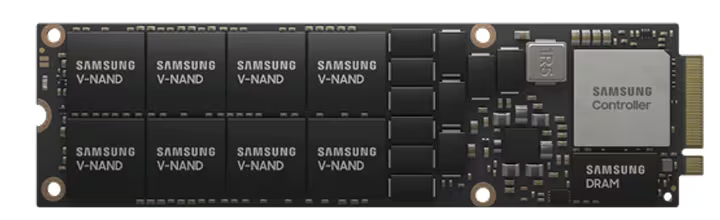
Samsung NF1 (formerly NGSFF). Designed as a “wider M.2” (30.5mm x 110mm) to accommodate multiple rows of high-capacity NAND chips for 1U servers. While it introduced enterprise features like hot-swapping and dual-port support, it failed to gain broad industry support. It is now considered a legacy format that never achieved the reach of the universally adopted EDSFF standard.
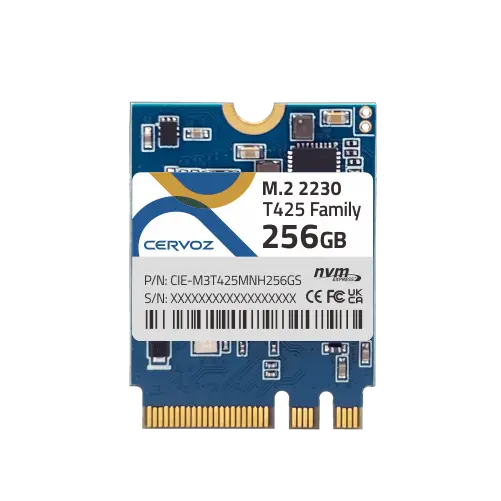
Key A+E NVMe Drives. The A+E keyed connectors were originally designed to host Wi-Fi/Bluetooth adapters. They are commonly used in ultrabooks, NUC PCs, and many desktop computer boards, typically featuring one or two PCIe lanes. Niche, third-party M.2 Key A+E NVMe drives exist, providing a hardware solution for adding a dedicated NVMe drive to space-constrained systems (like mini-PCs, homelab routers, or NAS builds). They have severe bandwidth limitations as standard M-Key slot provides 4 lanes of PCIe (x4), whereas an A+E slot typically provisions only PCIe x1 or x2. In addition, system firmware compatibility can be inconsistent. Some older environments may employ hardware whitelisting (restricting the slot to specific Wi-Fi modules) or lack the necessary NVMe drivers to boot the OS from the A+E interface. Yet, the existence of such storage devices proves the point: you cannot assume that a given board is a Wi-Fi/Bluetooth combo just because it is keyed A+E.
Conclusion
Things are not always what they look like. An M.2 board can be a storage device or a Bluetooth adapter, and a Wi-Fi-card slot can host an NVMe drive. The “22+34 pin” connectors are actually “12+16”; they can be either PCIe AHCI or NVMe, and will typically work in a third-party adapter. Newer Apple storage boards look like a stubby M.2 SSD – but they aren’t. Instead, they just host raw NAND chips, making the data entirely inaccessible outside of the host Apple device.


- iOS Forensic Toolkit 10.11: bootloader extraction for Apple Watch Series 4 and 5, Apple TV 4K 2nd Gen21 September, 2026
- Elcomsoft Quick Triage 2.2 adds a timeline, a plugin system, and file system snapshots3 September, 2026
- Elcomsoft System Recovery 8.38: Built-In BitLocker TPM Exploit Library, Browser Artefact Extraction, and Imaging Checksums26 August, 2026
- EIFT Firewall: a new free tool for controlled agent sideloading3 August, 2026
- Elcomsoft Phone Breaker 11.04: more reliable downloads from iCloud Drive30 July, 2026