
Low-Level Extraction for iOS 17 and 18
April 14th, 2026 by Oleg AfoninCategory: «Elcomsoft News», «Mobile», «Tips & Tricks»
We’ve just updated iOS Forensic Toolkit to version 10.0, significantly expanding its low-level extraction capabilities for both the extraction agent and bootloader-based methods. Previously, agent-based extraction was capped at iOS 16.6.1. This release finally covers the remainder of the iOS 16 branch, and adds support for the entire iOS 17 branch as well as iOS 18 through 18.7.1. We have also expanded checkm8 support to cover all the latest OS updates pushed by Apple on devices susceptible to the exploit. Finally, we improved extended logical acquisition support for iOS/iPadOS 26, now pulling significantly more shared data than before.
Update: for macOS we now offer EIFT Firewall, a free application that creates and filters the controlled USB path itself instead of layering rules on top of Internet Sharing, and saves an evidence archive for the session. It is described in the new post. We no longer recommend the older macOS firewall script.
Improving the Extraction Agent
For those new to the tool, the low-level extraction agent is a lightweight, in-house developed iOS app that plays a key role in low-level forensic acquisition. The agent packs all known and iOS exploits into a single tool. Once sideloaded onto a compatible iOS or iPadOS device, the agent:
- Applies a chain of exploits to elevate privilege level, escape the iOS sandbox, and gain access to the root of the file system as well as the encryption keys required to decrypt the keychain.
- Establishes a communication channel between the device and the expert’s computer.
- And finally, grants full file system access and Keychain extraction capabilities.
This method allows forensic experts to extract crucial evidence from iPhones and iPads at a low level, providing access to user data that would otherwise be impossible to retrieve.
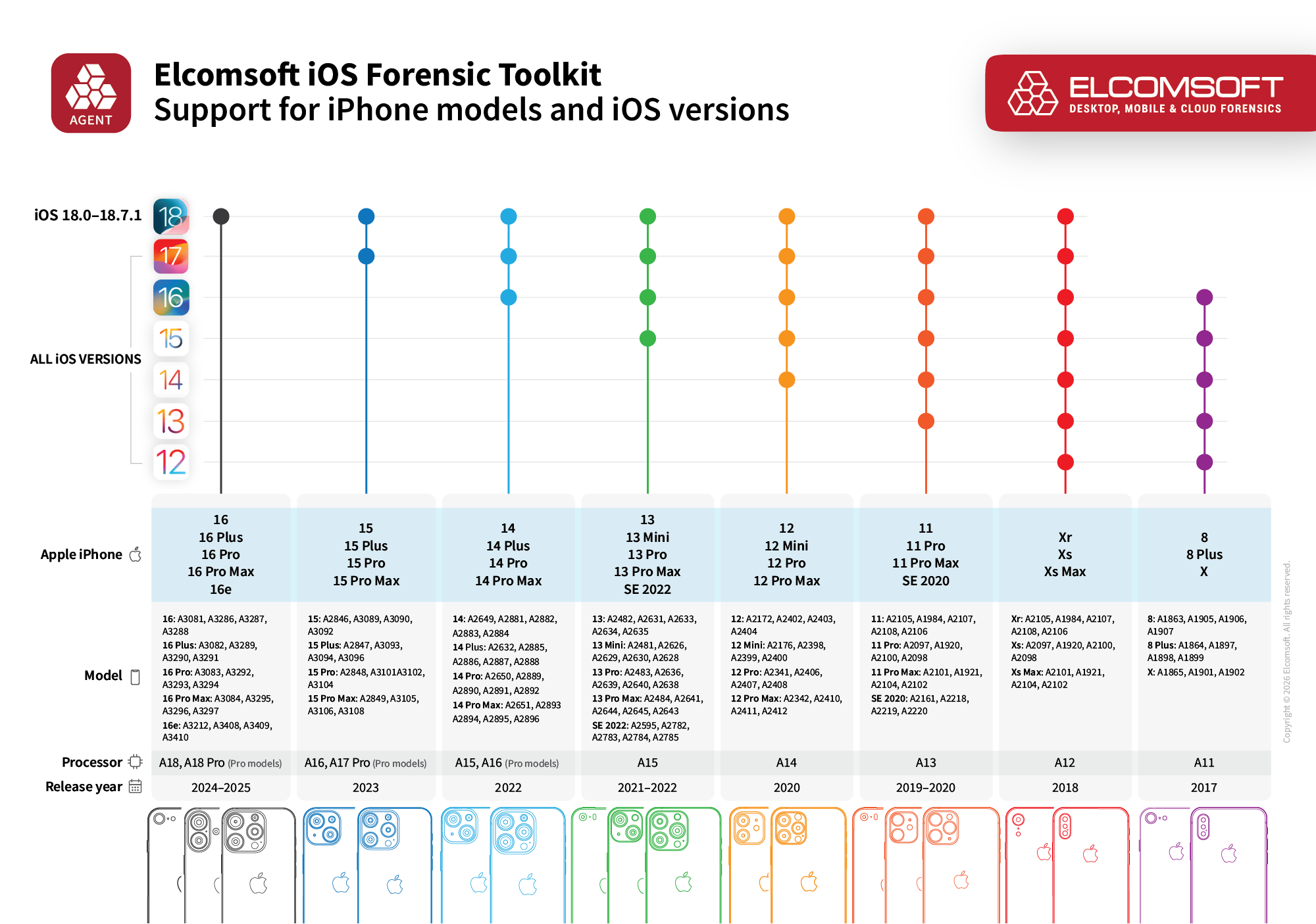
For quite a while, agent-based extraction hit a hard wall at iOS 16.6.1; newer releases required more powerful exploits, or more exactly, a chain of exploits. With version 10.0, we finally put the pieces of the puzzle together. First, we’ve added support for the remaining iOS 16 builds, covering iOS 16.7 through 16.7.15. More importantly, the agent now supports the entire iOS 17 branch (17.0 to 17.7.8) and introduces support for a range of iOS 18 versions (18.0 to 18.7.1).
The Hardware Matrix and Limitations
The updated agent targets devices powered by the A11 through A18 SoCs. In practical terms, this covers everything from the iPhone 8 and iPhone X all the way up to the iPhone 16 lineup (though be aware that the exploit is currently less stable on the iPhone 16 and may cause a reboot, requiring a few attempts to succeed).
Let’s talk about those older A11 devices for a second. If you’re wondering why we pushed agent support for the iPhone 8, 8 Plus, and X when they are already vulnerable to the hardware-level checkm8 exploit, it comes down to a Secure Enclave Processor (SEP) patch that Apple developed to curb bootloader-based extractions. On A11 iPhones, the extraction will only works if a screen lock passcode was never ever configured on the device out of the box. Even if the user previously had a passcode and you remove it, the extraction process will fail. Because of this SEP patch, agent-based extraction is realistically your only viable path for A11 iPhones running iOS 16, and still recommended if they are running iOS 14 or 15. We only recommend checkm8 extraction for A11 iPhones if they are running iOS 11 through 13.
Finally, there is a notable bottleneck when it comes to Apple Silicon. The new extraction capabilities for iPadOS 16.7+ and 17/18 currently apply only to iPads equipped with A-series chips. If you are dealing with an iPad running M-series Apple Silicon, agent-based extraction remains capped at iPadOS 16.6.1 for now. We paused M-series support to prioritize shipping the broader iPhone update, but we will bring those devices back into the fold in a future release.
Sideloading the extraction agent onto the device and running it requires navigating a few security roadblocks Apple has put in place. Here is what you need to know about the current operational workflow.
Certificate validation
Previously, we utilized a special 7-day certificate that bypassed the need for an internet connection (more on that in Extraction Agent: Offline Extraction with All Developer Accounts). Unfortunately, Apple recently patched this method out. Now, for developer accounts created after June 6, 2021, the device requires an active internet connection on the first launch to validate the certificate via Apple’s Provisioning Profile Queue (PPQ). Since putting an evidentiary device online is inherently risky, we strongly recommend routing the connection through a strictly configured firewall to block all traffic except the PPQ validation. We plan to fix the offline method eventually, but for now, the firewall approach is required. Check out Extraction Agent and Firewall: Software vs. Hardware, or the full instruction in Installing and Troubleshooting the Extraction Agent (2025) (for now, refer to the Sideloading with regular Apple IDs section even if you’re using a developer account opened after June 6, 2021).
Developer Mode
For devices running iOS 16 and newer, enabling Developer Mode after installing the agent is still mandatory. This requires a device reboot, and there is simply no way to bypass this step.
Trust and Authentication
Installing the agent requires establishing a trusted connection between your computer and the device. If the device is running iOS 17.3 or newer and has Stolen Device Protection enabled, establishing this trust will require biometric authentication (Face ID or Touch ID). For all other devices, you will need to enter the screen lock passcode on the device screen when prompted.
Expanded checkm8 Support
While the extraction agent got the spotlight in this release, we haven’t abandoned hardware-level exploits either. We pushed updates to the checkm8 extraction method, ensuring our bootloader-level exploit covers the latest security patches Apple dropped for older devices.
Specifically, checkm8 support now includes iOS and iPadOS 15.8.7, iPadOS 16.7.15, and iPadOS 18.7.5. We also added support for iOS 16.8.8, though keep in mind the usual checkm8 limitations still apply if you are dealing with A11 devices on this firmware (namely, for the iPhone range including the iPhone 8, 8 Plus, and iPhone X, checkm8 extractions are only possible if the device never had a passcode configured – that’s a SEP security patch for you). Finally, if you are extracting smart home or media hardware, we updated coverage for tvOS and audioOS to versions 26.3 and 26.4.
There is one known limitation, an edge case of an edge case that is likely to affect the absolute minority of your extractions. Some APFS images acquired via the Perfect Acquisition method currently refuse to mount on Windows machines. If you hit this roadblock, you will need to process the image on a Mac or Linux computer, or use dedicated forensic software capable of parsing the raw image directly instead of relying on the native OS to mount it.
One More Thing
Last but not least, we’ve added extended logical extraction support for iOS 26, including iOS 26.4, which delivers significant forensic value: this newly improved method can pull massive amounts of shared files, mostly documents, that do not normally make it into a standard backup.
REFERENCES:

Elcomsoft iOS Forensic Toolkit
Extract critical evidence from Apple iOS devices in real time. Gain access to phone secrets including passwords and encryption keys, and decrypt the file system image with or without the original passcode. Physical and logical acquisition options for all 64-bit devices running all versions of iOS.
Elcomsoft iOS Forensic Toolkit official web page & downloads »

- iOS Forensic Toolkit 10.12: bootloader extraction for the Apple HomePod mini9 October, 2026
- Elcomsoft Phone Breaker 11.05: iCloud extraction support for iOS 27 and the iPhone 18 range6 October, 2026
- iOS Forensic Toolkit 10.11: bootloader extraction for Apple Watch Series 4 and 5, Apple TV 4K 2nd Gen21 September, 2026
- Elcomsoft Quick Triage 2.2 adds a timeline, a plugin system, and file system snapshots3 September, 2026
- Elcomsoft System Recovery 8.38: Built-In BitLocker TPM Exploit Library, Browser Artefact Extraction, and Imaging Checksums26 August, 2026