
Special macOS Firewall: Safe Sideloading of the EIFT Extraction Agent
August 3rd, 2026 by Oleg AfoninCategory: «General»
Elcomsoft iOS Forensic Toolkit begins low-level extraction by sideloading the extraction agent, and the agent will not run until the phone has completed one or two checks against Apple’s servers. Network requests, on a phone that is evidence. That single requirement is why we have shipped three different firewalls over the past three years. The newest one, EIFT Firewall, is a free macOS application and a direct replacement for the 2023 script.
Why the phone needs the internet at all
An app installed outside the App Store has to be signed, and the phone has to be satisfied with that signature before it will launch the app. Depending on the account used for signing and on the iOS version, satisfying it costs one online check, or two.
The signature part has always been there. An app signed with a developer certificate installs and launches without argument, whenever that certificate was issued. An app signed with a regular Apple ID comes with the limit of three apps per week, and the phone additionally requires you to state explicitly that you trust that developer; that step is a request to ppq.apple.com, which is a fixed host and not hard to allowlist.
The second check is newer. Since iOS 16, the first launch also produces a request to a dynamically named host under humb.apple.com. It has no direct relation to the signature, and I am not certain what Apple gets out of it. It is skipped only when the app was signed with a paid developer account registered before 6 June 2021; newer developer accounts and regular accounts both trigger it. We have written about signing at length, most recently in Using the Extraction Agent in 2026, and the details of which account gets you what are there.
The operational point is short. The phone has to reach a small number of Apple hosts, one of which has a name that resolves to a different address every few minutes, and nothing else. Arranging exactly that is harder than it sounds.
Why not just plug it in
The moment the device has general connectivity, iCloud sync resumes, Find My becomes reachable, and a remote lock or erase command issued by anyone with access to that Apple account will land. Messages arrive, apps update, and the state of the device changes while it sits on your desk. Once the device has been on the open internet during your session, you get to explain that in the report.
The fix has always been the same: allow the checks, block everything else.
The 2023 script, and why we are retiring it
Our first solution was a shell script that reconfigured pf, the macOS packet filter, on top of macOS Internet Sharing over USB. It is documented in Sideloading the Extraction Agent using a Firewall. It worked, and for three years it was the only option for people who did not want to buy hardware.
It was also fragile in ways that are worth spelling out, because they explain the design of the new tool.
Part of the trouble was the allowlist. The script resolved the current IP address of Apple’s provisioning host and wrote a rule for that address. Apple rotates that address every few minutes; the script displayed a countdown, and the guidance was to wait until you had a 200 to 300 second window before touching the target device. It filtered TCP only. Private Relay and VPN on the phone broke it. It required a second iPhone, every single run, to confirm that blocking actually worked before the evidence device was connected.
The bigger problem was that the script never created the network path. macOS Internet Sharing did, by its own means, and the script could only try to filter that path afterwards. The rules might fail to apply to the shared interface, or apply and block it outright, and neither outcome announced itself.
The interfaces are why. An iPhone generates a fresh MAC address on every connection, so macOS creates a new enX interface each time; from the iPhone 16 on, it creates two. Internet Sharing then shows duplicate entries for one device, and you choose between them by guesswork. Leave Internet Sharing enabled, reconnect the phone after the script has stopped, and the phone is on the open internet with nothing in front of it; at that point the odds of a remote lock landing on your evidence are as high as they get. There were many places to make a mistake, and most of them looked exactly like success.
The worst part was the failure mode. When the configuration was wrong, the script did not stop; the phone simply got general internet access with no warning.
The Raspberry Pi firewall
The hardware approach, compared here, moved the filtering off the workstation entirely: a Raspberry Pi running our firmware, sitting between the phone and the network. Firmware for the Pi 3 and Pi 4 is open source at github.com/Elcomsoft/eiftpi; for the Pi 5 we have a prebuilt image which is closed source but free, available from support on request.
This is a good solution and we are not retiring it. It is host independent, so it works with the Windows and Linux editions of the Toolkit as well as macOS. After the initial setup it is close to plug and play. The costs are real but modest: a board, Ethernet adapters, cables, power, and one SSH configuration step if the Pi uplinks over Wi-Fi. We generally advise against Orange Pi boards; in our testing they were unreliable in this role.
The obvious downside is that it is hardware you have to own.
EIFT Firewall
EIFT Firewall is a free macOS application that creates a temporary, controlled USB network path between the Mac and the connected iPhone. It is a companion to iOS Forensic Toolkit, not part of it, and it is a full application with a privileged helper rather than a script you chmod and hope for the best.
It needs macOS Sonoma (14.x) or newer; no VMs, no hackintoshes, Apple Silicon only. We do have an Intel build, but we don’t have an old enough Mac to test it on, so no guarantees here.
Three things matter about it.
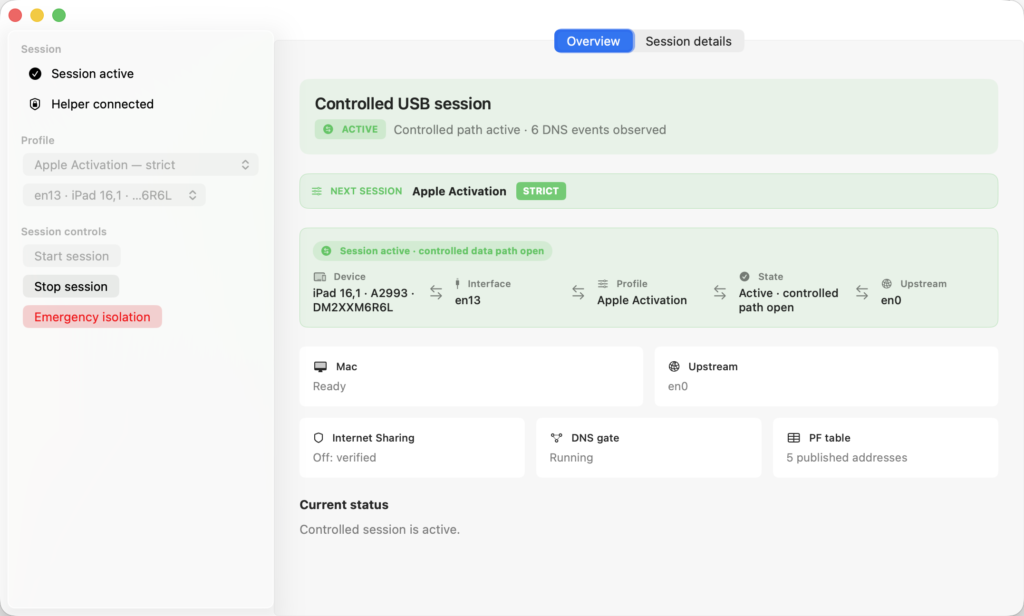
It does not use macOS Internet Sharing. It builds the path itself, which is the whole point: the component that creates the connection is the same component that filters it, so there is no window in which one exists without the other. Internet Sharing being enabled counts as a conflict, and the app refuses to start a session until you turn it off. Before Start session becomes available at all, the app runs a read only preflight covering the selected iPhone interface, the upstream interface, helper status, and whether an earlier session still needs recovery. If any of that cannot be confirmed, Start stays unavailable and the app tells you which condition failed.
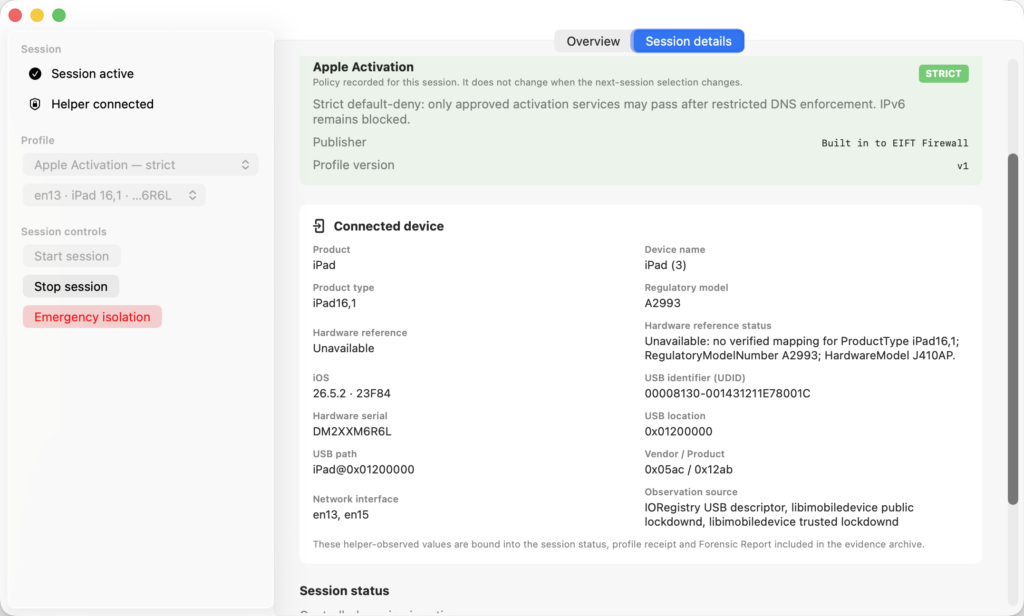
It fails closed, deliberately, in every direction. For the agent workflow you select the profile named Apple Activation, strict: it permits approved activation services only, after restricted DNS enforcement, and blocks all other traffic along with all IPv6. If the iPhone is unplugged mid-session, the helper tears the path down rather than bringing it back when the interface reappears. If a previous teardown cannot be confirmed, the app will not let you start a new session. There is also an emergency isolation button that kills the controlled path immediately; it is disruptive by design, and you start over afterwards.
It produces evidence. File → Save Session Evidence Log… writes a .tar.gz archive containing an English language forensic-report.md, the profile receipt, session status and teardown result, connected device details, the DNS decision log, the runtime log, and an evidence-manifest.json with SHA 256 hashes of the contents. The app shows you what is going into the archive before it writes it. This is the part the old script never had; previously your record of what the phone was permitted to reach was whatever you wrote down yourself.
Other profiles exist for other jobs, including broad IPv4, RFC 1918 local networks, and signed service allowlists issued by support. For sideloading the agent, Apple Activation is the one you want.
What it does not do
The application controls the USB path it creates. It does not, by itself, prove that the iPhone has no other uplink. If Wi-Fi or cellular data is on, the phone can reach the internet without EIFT Firewall having any say in it. Turn wireless off on the device, verify it, and record that separately; the tool is explicit about this limit and so am I.
It is macOS only, which is the same constraint the old script had. If the iOS Forensic Toolkit host runs Windows or Linux, use the Pi.
It is not a general purpose firewall. No arbitrary rules, no root terminal, no packet capture, no arbitrary DNS forwarding. It also does not change anything about signing: you still need an investigator controlled Apple ID with a trusted Apple device attached to it to answer the two-factor prompt.
Using it, in outline
The full documentation ships with the application in English and Russian, so this is the shape of the workflow rather than the procedure.
- Make sure macOS Internet Sharing is off before anything else is connected.
- On the iPhone, turn off Wi-Fi, Bluetooth, and cellular data, disable Private Relay and any VPN, and check that the date and time are correct. A deeply discharged phone that has reset its clock to 1970 will fail signature validation.
- Sign and install the agent with iOS Forensic Toolkit as usual.
- Install EIFT Firewall on the Mac and launch it. If it asks to install or update the helper, do that and approve the macOS administrator prompt, then refresh.
- Connect the iPhone by USB. If the phone asks whether to trust this computer, unlock it and confirm; without pairing, nothing further works. Wait for preflight and confirm that the interface shown is the intended device.
- Select the Apple Activation profile, select Start session, and confirm.
- Wait for the state to reach ACTIVE. The header turns green and reads that the controlled data path is open. An IN PROGRESS badge means the request was accepted, not that a path exists.
- On the phone, trust the developer profile and launch the agent so that validation happens. The header shows a count of observed DNS events.
- Stop the session and wait for the app to report a verified teardown.
- Save the evidence archive, then disconnect the device.
Which one should you use
Short answer: on a Mac, EIFT Firewall. On Windows or Linux, the Raspberry Pi.
Longer answer: EIFT Firewall replaces the 2023 script for everyone, with no exceptions I can think of. It takes Internet Sharing out of the picture, it removes the spare test iPhone from the procedure, it refuses to run rather than running wrong, and it leaves an archive behind. The Pi keeps its place for multi platform labs and for anyone who prefers the isolation to live in a separate box rather than on the workstation doing the extraction. Both are free.
EIFT Firewall is available from the Elcomsoft website at no charge, with the user guide included.
REFERENCES:

Elcomsoft iOS Forensic Toolkit
Extract critical evidence from Apple iOS devices in real time. Gain access to phone secrets including passwords and encryption keys, and decrypt the file system image with or without the original passcode. Physical and logical acquisition options for all 64-bit devices running all versions of iOS.
Elcomsoft iOS Forensic Toolkit official web page & downloads »

- iOS Forensic Toolkit 10.12: bootloader extraction for the Apple HomePod mini9 October, 2026
- Elcomsoft Phone Breaker 11.05: iCloud extraction support for iOS 27 and the iPhone 18 range6 October, 2026
- iOS Forensic Toolkit 10.11: bootloader extraction for Apple Watch Series 4 and 5, Apple TV 4K 2nd Gen21 September, 2026
- Elcomsoft Quick Triage 2.2 adds a timeline, a plugin system, and file system snapshots3 September, 2026
- Elcomsoft System Recovery 8.38: Built-In BitLocker TPM Exploit Library, Browser Artefact Extraction, and Imaging Checksums26 August, 2026