
iOS Forensic Toolkit 10.13: app data extraction for the full iOS 26 range
November 17th, 2026 by Oleg AfoninCategory: «Elcomsoft News», «Tips & Tricks»
iOS Forensic Toolkit 10.13 extends agent-based extraction to iOS and iPadOS 26, currently from 26.0 through 26.7.3. The tool now supports all devices that can run iOS/iPadOS 26, including the iPhone 17 lineup and M5-based iPads. The method is a partial file system extraction. It returns the data of (mostly) third-party apps, while system data is mostly unreachable. Notably, the extraction agent can be sideloaded over the air, which makes extraction possible on iPhones with Stolen Device Protection turned on.
Two obstacles to consent-based extraction
In consent-based cases the examiner knows the passcode and can unlock the device. Yet, two obstacles remain.
- Full file system extraction needs a kernel exploit. A full file system image holds far more evidence than a backup: system databases, the complete keychain, app data, and so on. Getting it requires kernel-level access. On recent Apple chips it also requires bypassing hardware-level protections. Kernel support for each new iOS build takes time to develop.
- Stolen Device Protection blocks pairing. With Stolen Device Protection (SDP) active, an iPhone (but not an iPad) asks for Face ID or Touch ID before pairing with a computer away from familiar locations. A forensic lab is never a familiar location. Without pairing, the examiner cannot make even a logical acquisition. iPadOS has no SDP, and iPads pair with the passcode as before.
We addressed the pairing problem earlier by sideloading the extraction agent over the air (Sideloading the extraction agent: a Stolen Device Protection workaround); OTA installation needs no pairing. Until now, though, the agent could extract data only on iOS versions where we had kernel access.
How the new method works
The new extraction path relies on a sandbox escape. Exploits of this class are lighter than kernel exploits and are easier to implement. The agent escapes its own sandbox and reads the folders that hold app data:
/var/mobile/Containers/Data/Application/*
/var/mobile/Containers/Shared/AppGroup/*
/var/mobile/Containers/Data/InternalDaemon/*
/var/mobile/Containers/Data/PluginKitPlugin/*
The first two hold most of the evidence. Data/Application contains the private container of each app. Shared/AppGroup contains App Group containers: shared storage used by an app together with its extensions, or by several apps from one developer. Many apps keep their main databases there; Telegram is one of them, as well as X (Twitter), Facebook Messenger, Viber, WeChat, Outlook, Gmail, and so on, and so forth.
What you get and what you don’t
The method returns app data, while most system data stays out of reach.
| Extracted | Not extracted |
|---|---|
| Instant messengers: Telegram, WhatsApp, Threema etc | System databases, text messages, iMessage |
| Social networks: X (Twitter), Instagram, Threads, TikTok | Call log, contacts |
| Third-party email clients: Outlook, Gmail, etc. | System address book, stock Mail app |
| Financial, navigation and location apps | Camera roll, Maps |
| Apple Notes (may contain saved passwords) | Keychain |
Some other Apple data stored in App Group containers may also be present. How much exactly depends on what analysis tools learn to parse.
Extended logical acquisition fills most of the gaps. It returns the complete photo library, a copy of the keychain, media, shared files and logs. When the device can be paired, use both methods. The order does not matter. Both methods are safe, and an examiner who knows the passcode can unlock the device if it reboots.
When to use it
The right method depends on the OS version and on whether the device can be paired.
- iOS 26.0–26.7.3, SDP active, no biometrics available. Wired pairing is blocked, and logical acquisition is not available. Sideload the agent over the air and extract app data. This may be the only data you can get from the device.
- iOS/iPadOS 26.0–26.7.3, pairing possible (SDP off, the owner’s biometrics available, or an iPad). Run extended logical acquisition and agent-based extraction, in either order.
- iOS versions with kernel-level support. Full file system extraction returns the most data. Check the compatibility chart in the user’s manual.
- iOS/iPadOS 27. Support for 27.0–27.2.1 is in development and planned for the next update.
Before analysis: which container belongs to which app
Containers are stored in folders named by UUID, and the folder name says nothing about the owning app. Most analysis tools identify the owner by reading .com.apple.mobile_container_manager.metadata.plist, a small file inside each container that records its identifier.
The agent extracts this file from Data/Application containers. In Shared/AppGroup containers it lacks the permissions to read it. The data in those containers is extracted in full; only the metadata file is missing.
Tools that depend on the metadata file may skip App Group data. In our tests, one popular analysis tool did not see Telegram data at all. Telegram keeps its chats, contacts and calls in its App Group container. An older version of another popular tool failed the same way, while its current version parses the extraction without the file. In one test case, adding the missing metadata files raised the number of Telegram records from a few hundred to more than a hundred thousand. Device-wide totals for messages, contacts and calls grew as well, since much of that data came from Telegram.
There are other ways to map container folders to apps, so check whether your tool shows data from App Group containers before relying on its results. For background on App Groups and their metadata files, see iOS Application Groups & Shared data on Swift Forensics.
iOS Container Metadata Builder
We made a small utility that recreates the missing metadata files. It writes each file into the corresponding app’s container in the form it would have on the same device after a full file system extraction. Download it here:
Download iOS Container Metadata Builder
A file is written only after two independent confirmations of the owning app. Sources of confirmation include:
- a record in the LaunchServices cache (
com.apple.LaunchServices-*.csstore) that links the App Group identifier to the app; - the app’s own logs that reference the container path;
- the app’s genuine metadata file in its
Data/Applicationcontainer.
Containers without enough confirmation are marked “unconfirmed”.
How to use
It’s rather simple:
- Unpack the extraction (.tar) into a new folder.
- Run iOS Container Metadata Builder.
- Click Browse… and select the folder.
- Click FIND ALL .PLIST FILES. The log lists each container with its identifier.
- Click CREATE TELEGRAM PLIST to add the file for Telegram only, or CREATE ALL PLIST FILES to add it to every container where it is missing.
- Open the folder in your analysis tool.
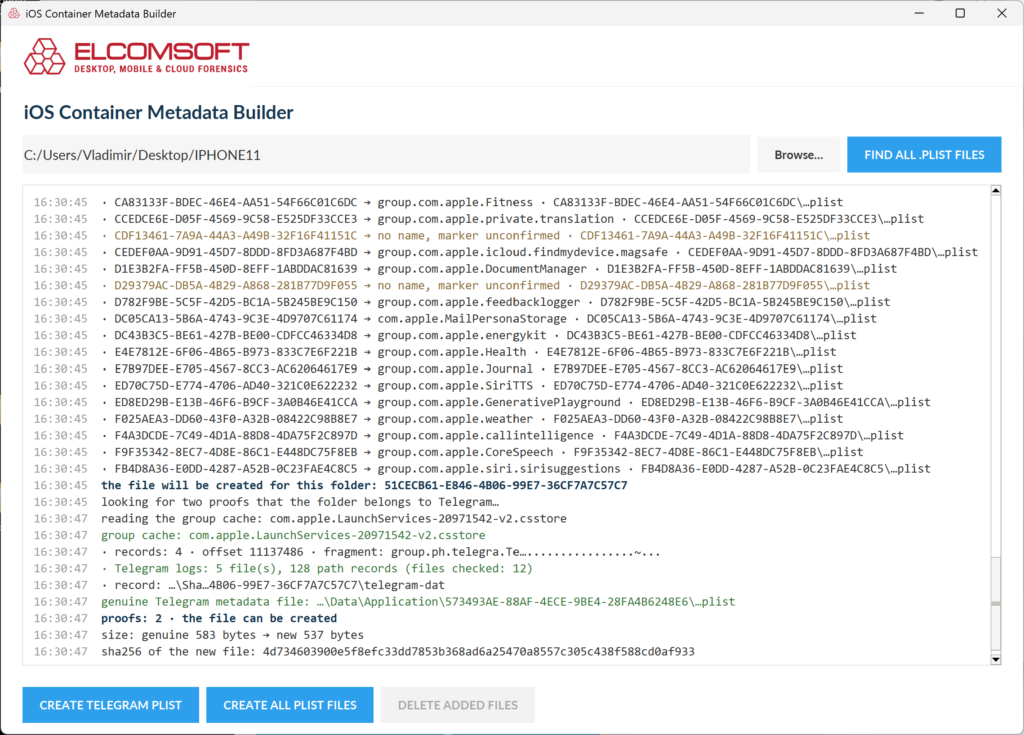
DELETE ADDED FILES removes everything the utility wrote, basically returning the file system to its original, as-extracted, state. The button works only during the current session until the program is closed.
Document the change
The generated files carry no mark that sets them apart from originals. After the utility runs, the extraction contains files the agent did not extract from the device. Record this in the case notes:
- Keep the original .tar and its hash. Run the utility on an unpacked copy.
- Save the utility’s log. It records the size and SHA-256 hash of each created file.
- State in the report which containers received generated metadata files and which confirmations were found.
Source code
A simpler, command-line only version of the utility will be available on GitHub as Python source code. We see it as a temporary measure. Once analysis tools identify containers by more reliable means and support partial file system extractions directly, the utility will no longer be needed.
Summary
iOS Forensic Toolkit 10.13 extracts app data from every iPhone and iPad running iOS/iPadOS 26.0 through 26.7.3, including iPhones with Stolen Device Protection. Combine it with extended logical acquisition whenever the device can be paired. Before relying on the results, check that your analysis tool recognizes App Group containers, and use iOS Container Metadata Builder if it does not.
REFERENCES:

Elcomsoft iOS Forensic Toolkit
Extract critical evidence from Apple iOS devices in real time. Gain access to phone secrets including passwords and encryption keys, and decrypt the file system image with or without the original passcode. Physical and logical acquisition options for all 64-bit devices running all versions of iOS.
Elcomsoft iOS Forensic Toolkit official web page & downloads »
- iOS Forensic Toolkit 10.13 adds agent-based file system extraction for the entire iOS 26 range17 November, 2026
- iOS Forensic Toolkit 10.12: bootloader extraction for the Apple HomePod mini9 October, 2026
- Elcomsoft Phone Breaker 11.05: iCloud extraction support for iOS 27 and the iPhone 18 range6 October, 2026
- iOS Forensic Toolkit 10.11: bootloader extraction for Apple Watch Series 4 and 5, Apple TV 4K 2nd Gen21 September, 2026
- Elcomsoft Quick Triage 2.2 adds a timeline, a plugin system, and file system snapshots3 September, 2026